
Discover the Future of Design
Introducing the R2025x FD02 Update for SOLIDWORKS
Explore the latest enhancements in 3DEXPERIENCE SOLIDWORKS, designed to boost your productivity and streamline your design process.

What's New in R2025x FD02
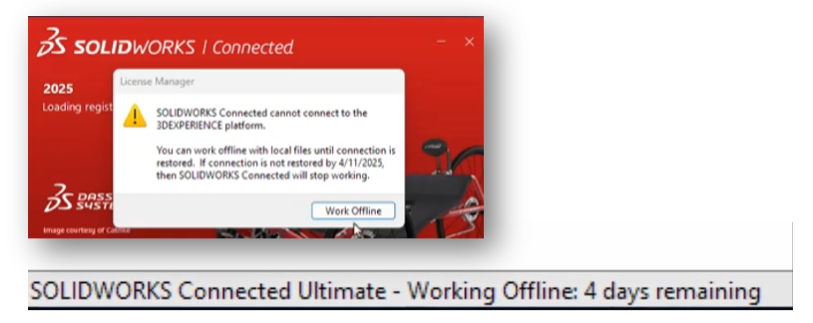
Unplanned Offline Mode
Stay productive even without an internet connection. Save your work and seamlessly continue in Offline Mode.
Enhanced Command Search
Find commands faster with expanded keyword search, including terms from other CAD tools.
Hide/Show Text Expression
Easily manage property expressions on drawing sheets without hovering over annotations.
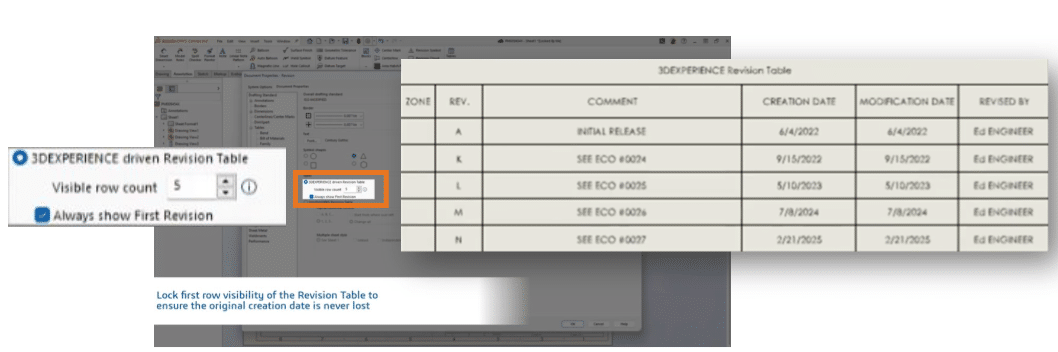
Lock First Row Visibility
Keep original revision information visible at all times for better design clarity.
Stay Connected with Unplanned Offline Mode
With the Unplanned Offline Mode, you can continue working in 3DEXPERIENCE SOLIDWORKS even if your internet connection drops. This feature allows you to save your progress and restart the application in Offline Mode, ensuring that your workflow remains uninterrupted. By maintaining productivity during unexpected disconnections, you can focus on your design tasks without worrying about connectivity issues.
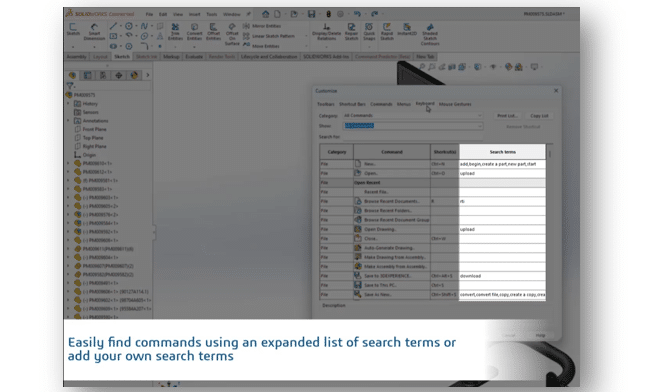
Enhanced Command Search
The Enhanced Command Search feature in the R2025x FD02 update significantly elevates user interaction by broadening the scope of discoverable commands. By integrating an extensive array of keywords, users can now locate commands using familiar terms, even those from other CAD applications. This improvement not only streamlines the workflow but also enhances accessibility, ensuring that users can quickly find and execute commands. Additionally, the inclusion of relevant keyboard shortcuts in the search results further optimizes efficiency, making it easier for users to navigate and utilize the full potential of 3DEXPERIENCE SOLIDWORKS.
Hide/Show Text Expression of Properties
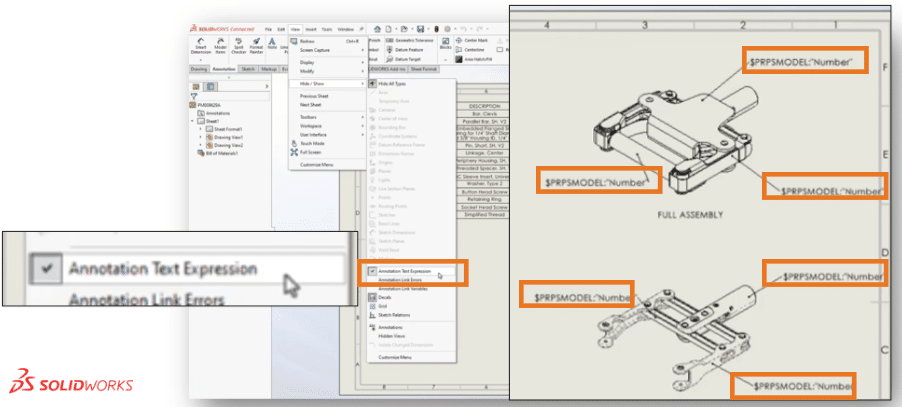
The ability to Hide/Show Text Expression of Properties introduces a streamlined approach to managing property links within drawings. By enabling users to quickly toggle the visibility of text expressions, this feature simplifies the process of reviewing and managing property expressions. It eliminates the need for hovering over annotations, thus saving time and reducing potential errors. This enhancement is particularly advantageous for users dealing with complex drawings, as it provides a clear and concise method to oversee property links, ultimately improving workflow efficiency.
Lock First Row Visibility for Revision Tables
Maintaining clarity in design revisions is crucial, and the Lock First Row Visibility for Revision Tables feature addresses this need effectively. By ensuring that the original creation date remains visible regardless of the number of revisions, users can keep track of the design's starting point without losing critical information. This feature is essential for maintaining a clear audit trail, providing designers with a reliable reference point for all subsequent changes. It enhances the overall clarity and integrity of the revision process, ensuring that vital information is always at hand.
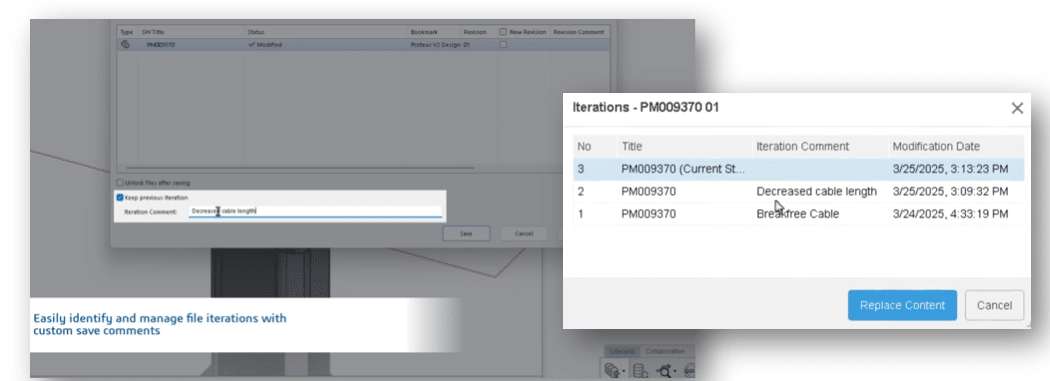
Manage File Iteration Comments
Enhance your file management capabilities with the new Manage File Iteration Comments feature. This tool allows you to add personalized comments to each file iteration during the save process, providing a clear and detailed history of changes. By documenting your thoughts and intentions at each step, you can easily track the evolution of your designs and make informed decisions based on past iterations. This feature streamlines collaboration and ensures that every team member is on the same page, ultimately improving project efficiency and accuracy.
Streamline Your Workflow
With the ability to annotate each file iteration, you can quickly identify the purpose and context of changes, reducing the time spent searching for specific versions. This feature is particularly beneficial in collaborative environments, where multiple users interact with the same files. By maintaining a comprehensive record of comments, you ensure that all stakeholders have access to the insights and rationale behind each modification, fostering a more transparent and efficient workflow.

Dynamic Scene Rendering
Transform your renderings with the Random Position, Rotation, and Scale for Scene Elements feature. This innovative tool allows you to create more dynamic and realistic scenes by randomizing the placement, scale, and rotation of model groups. By utilizing the Relative Transforms and Random Seeds, you can experiment with different configurations to achieve the perfect visual balance. This feature not only enhances the aesthetic appeal of your renderings but also saves time by automating the process of scene setup, allowing you to focus on creativity and design.
Ready to upgrade to SOLIDWORKS R2025x FD02?
Discover the powerful new features of the SOLIDWORKS and the new R2025x FD02 update and elevate your design capabilities. Don't miss out on the opportunity to leverage these cutting-edge tools.
Contact us today and learn the full potential of SOLIDWORKS.