SOLIDWORKS

MySolidWorks Professional Registration Changes

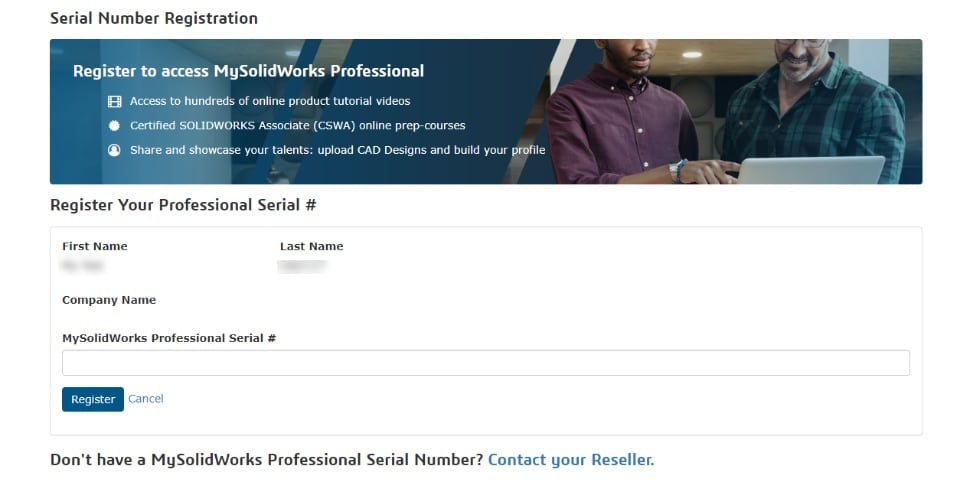
Starting 19th January 2023, customers will need to register their MySolidWorks Professional license using a dedicated registration page instead of the SOLIDWORKS Customer Portal to unlock additional training content.

For existing customers who have previously registered their MySolidWorks Professional Serial Number, no action is needed.

For new customers, they will need to follow the instructions below to register their license and activate their MySolidWorks Professional Account:

  1. Login to MySolidWorks: MySolidWorks - Official SOLIDWORKS Community
  2. Navigate to the MySolidWorks Professional registration page (My Profile > My Subscription > Upgrade).
  3. Enter their MySolidWorks Professional Serial Number and click Register.
SOLIDWORKS & AI

SOLIDWORKS & AI

For nearly three decades, SOLIDWORKS has empowered engineers to achieve more through innovation and productivity. SOLIDWORKS AI takes this mission to the next level by embedding advanced AI capabilities directly into the tools engineers trust, enabling faster design,...

Scottish Manufacturing and Supply Chain Conference 2026

Scottish Manufacturing and Supply Chain Conference 2026

The Scotland Manufacturing & Supply Chain Conference 2026 brings together manufacturers, engineers, supply chain professionals, business leaders and technology experts for two days of insight, innovation and networking in Glasgow. Discover the latest developments...

Speed up designs, with fewer errors and rework

Speed up designs, with fewer errors and rework

Engineering teams in custom manufacturing spend a lot of time creating “same but different” designs. Manually updating dimensions, creating drawings, and checking documents for every new order is time-consuming, slows down design cycles, and increases the risk of...