Boost Efficiency with AutoCAD Sheet Set Manager
Managing large collections of drawings can quickly become one of the most time-consuming parts of any design project. Whether you're working in architecture, manufacturing, construction or engineering, keeping drawing sets organised, title blocks accurate and publishing consistent documentation often involves repetitive manual work.
Fortunately, AutoCAD Sheet Set Manager (SSM) offers a smarter way to manage projects.
By centralising your drawing sheets into a single, organised structure, Sheet Set Manager helps reduce administration, improve collaboration and maintain consistency across every stage of your project.
In this guide, we'll explain what AutoCAD Sheet Set Manager is, its key benefits and why it's one of the most valuable but often overlooked- productivity tools available in AutoCAD.
What Is AutoCAD Sheet Set Manager?
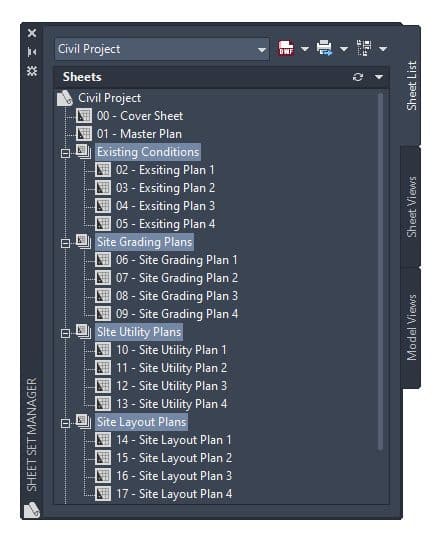
AutoCAD Sheet Set Manager is a built-in tool that enables users to organise multiple drawing layouts into a single project.
Rather than opening and managing individual DWG files one at a time, you can access, update and publish an entire drawing package from one central location.
Importantly, Sheet Set Manager doesn't duplicate your drawings. Instead, it references layouts stored within existing DWG files, allowing multiple team members to work on different drawings simultaneously while keeping the overall project organised.
For projects containing dozens or even hundreds of drawings, this creates a far more structured and efficient workflow.
Why Use Sheet Set Manager?
Many AutoCAD users still manage drawings individually, updating title blocks manually and publishing sheets one at a time. While this may be sufficient for smaller projects, it becomes increasingly difficult to maintain consistency as documentation grows.
Sheet Set Manager simplifies these processes through automation, standardisation and centralised project management.
Keep Projects Organised
Instead of searching through multiple folders to locate drawings, every sheet is accessible through a single interface.
Drawings can be arranged into logical subsets based on:
- Project stages
- Disciplines
- Drawing packages
- Building areas
- Manufacturing assemblies
This makes navigation faster and significantly reduces the chance of using incorrect or outdated drawings.
Standardise Documentation
Consistency is essential across every project. Sheet Set Manager helps standardise key documentation elements, including:
- Drawing templates
- Title blocks
- Plot configurations
- Sheet numbering
- Project information
- File naming conventions
By using common standards across your organisation, teams can produce professional, consistent drawing packages regardless of who creates them.
Eliminate Repetitive Data Entry
Updating project information manually across dozens of drawings is both time-consuming and prone to errors.
Sheet Set Manager allows project information, including drawing numbers, project names, client details and revision information to be stored centrally.
Once linked to your title blocks, these properties automatically update wherever they're referenced, saving valuable time while improving document accuracy.
Publish Complete Drawing Sets in Minutes
Creating drawing packages is often one of the most repetitive tasks within a project.
Instead of opening each drawing individually, Sheet Set Manager enables users to publish entire drawing sets as a single operation. Whether producing:
- PDF drawing packs
- Printed construction sets
- Client issue packages
- Electronic deliverables
The publishing process becomes quicker, more reliable and far less repetitive. For larger projects, these time savings can quickly add up.
Improve Team Collaboration
Most design projects involve multiple people working across different disciplines, making effective collaboration essential.
Sheet Set Manager supports collaborative working by referencing drawing layouts rather than storing everything in a single file. This allows team members to work on separate drawings at the same time while maintaining a well-organised, coordinated sheet set.
The result is fewer workflow bottlenecks, improved version control and greater confidence that everyone is working from the latest project information. For larger architectural, engineering and manufacturing projects, this can significantly improve efficiency and reduce the risk of documentation errors.
Make Better Use of Project Information
Sheet Set Manager does far more than organise drawings, it also helps manage project data.
Alongside standard properties such as project names and drawing numbers, organisations can create custom fields tailored to their workflows, including:
- Client details
- Project location
- Contract numbers
- Revision status
- Discipline codes
- Internal project references
Once configured, these custom properties automatically populate title blocks and annotations throughout the project, reducing duplication while improving consistency.
Best Practices for Getting Started
Like many AutoCAD productivity tools, the biggest gains come from introducing Sheet Set Manager gradually.
Rather than implementing every feature immediately, many organisations start with a few core workflows before expanding their use over time. A good starting point includes:
- Creating company-wide sheet set templates
- Automating title block information
- Standardising plotting and publishing
- Organising drawings into logical subsets
- Establishing consistent naming conventions
This phased approach allows teams to adopt new workflows without disrupting existing projects.
Is AutoCAD Sheet Set Manager Right for Every Project?
Not every project requires a fully configured sheet set. For smaller jobs involving only a handful of drawings, traditional methods may still be perfectly adequate.
However, once projects increase in size or involve multiple contributors, the benefits become increasingly clear. Sheet Set Manager helps organisations:
- Improve project organisation
- Reduce repetitive administration
- Standardise documentation
- Simplify publishing
- Minimise errors
- Increase productivity
Even adopting just a few features can lead to significant time savings across every project.
Learn More with TMS CADCentre
AutoCAD Sheet Set Manager remains one of the software's most underutilised productivity features. While it requires a small amount of initial setup, the long-term gains in efficiency, consistency and document control make it well worth the investment.
If your business regularly produces multi-sheet drawing packages, now is an ideal time to explore how Sheet Set Manager can transform your workflow.
At TMS CADCentre, our Autodesk-authorised training courses are designed to help users work smarter, not harder. From essential drafting techniques to advanced documentation workflows, you'll gain practical skills that can immediately improve productivity across your projects.
Ready to get more from AutoCAD? Explore our AutoCAD training courses or speak to the TMS CADCentre team to find the right course for you.