Choosing the right CAD software can have a major impact on your business productivity, project capabilities, and costs. For many architects, engineers, designers, and construction professionals, the decision often comes down to two Autodesk products: AutoCAD and AutoCAD LT.
While both platforms share the same core drafting environment, they are designed for very different workflows. AutoCAD LT focuses on efficient 2D drafting and documentation, while full AutoCAD includes advanced 3D modelling, automation tools, specialised toolsets, and industry integrations.
So which version is right for your business? Let’s break it down.
What is AutoCAD?
AutoCAD is a professional CAD platform used for both 2D drafting and 3D design. It includes advanced modelling tools, automation features, APIs, and specialised industry toolsets for architecture, mechanical engineering, electrical design, and more.
AutoCAD is typically used by:
- Large architecture firms
- Engineering companies
- Manufacturers
- Construction and infrastructure businesses
- Teams requiring advanced automation or collaboration.
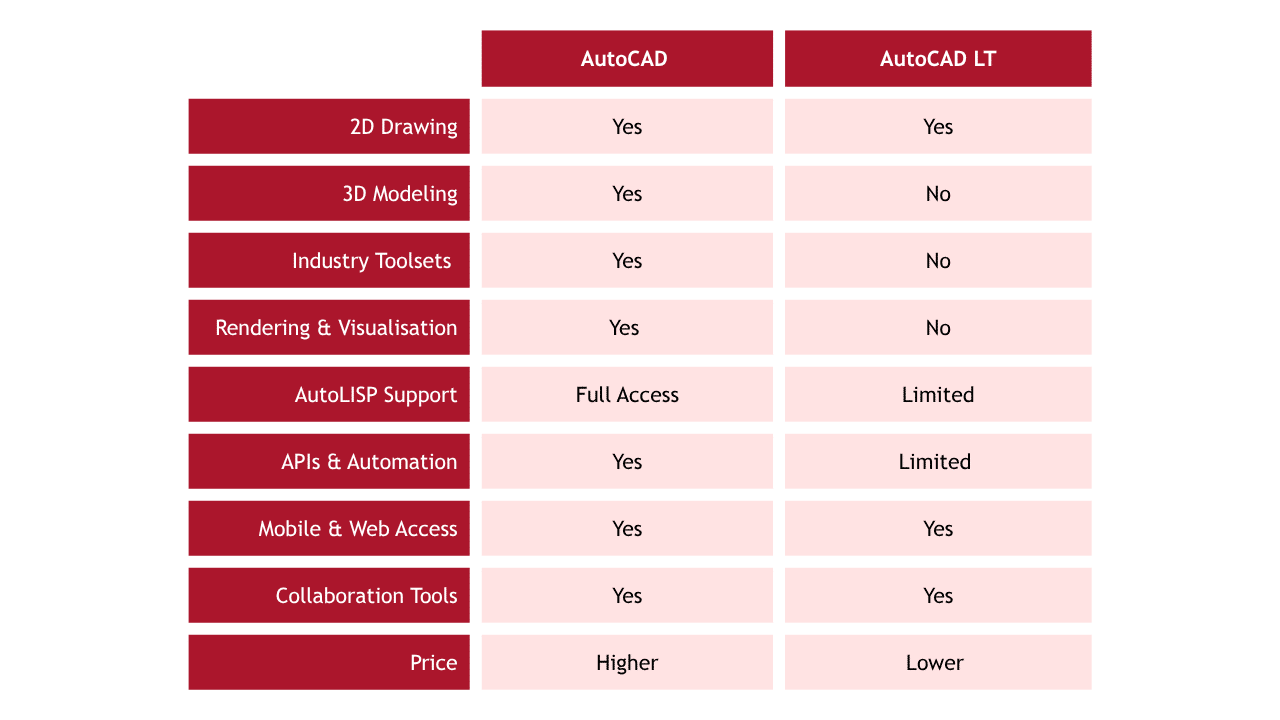
The software also includes seven specialised toolsets and full 3D functionality.
What is AutoCAD LT?
AutoCAD LT is the streamlined, lower-cost version of AutoCAD focused primarily on professional 2D drafting and documentation.
AutoCAD LT is designed for:
- Freelancers
- Small design studios
- Interior designers
- Contractors
- Businesses focused mainly on 2D workflows.
AutoCAD LT includes many core drafting tools, annotation features, cloud collaboration, and support for basic automation.
AutoCAD vs AutoCAD LT: The Key Differences
One of the biggest distinctions is the 3D capability. AutoCAD includes 3D modelling, rendering, mesh modelling, and parametric tools, while AutoCAD LT focuses almost entirely on 2D drafting.
Another major difference is automation and extensibility. Businesses using custom plugins, advanced workflows, or third-party integrations will generally need full AutoCAD.
When Full AutoCAD Makes More Sense
Full AutoCAD is the better investment if your business:
- Uses 3D workflows regularly.
- Requires advanced automation.
- Needs industry-specific toolsets.
- Integrates with custom plugins or APIs.
- Manages complex engineering projects.
Larger organisations often benefit from the additional productivity tools, especially when coordinating across architecture, mechanical, and electrical disciplines.
You should also consider full AutoCAD if your team plans to scale or adopt BIM and advanced design workflows in the future.
When AutoCAD LT is the Better Choice
AutoCAD LT is ideal if your business:
- Primarily produces 2D drawings.
- Needs reliable CAD documentation.
- Has a limited software budget.
- Doesn’t require 3D modelling.
- Works on smaller-scale projects.
Many small firms successfully use AutoCAD LT alongside tools like SketchUp or Revit for occasional 3D work. Community discussions also highlight LT as a strong starting point for businesses focused on drafting efficiency rather than complex modelling.
Typical users include:
- Interior designers
- Residential designers
- Freelance drafters
- Surveyors
- Contractors
Final Verdict: Which Should You Choose?
There’s no universal winner between AutoCAD and AutoCAD LT - the best choice depends entirely on your business needs.
Choose AutoCAD if:
- You need 3D modelling.
- You require advanced automation.
- Your projects are technically complex.
- You want specialised toolsets and scalability.
Choose AutoCAD LT if:
- You mainly work in 2D.
- You want a lower cost solution.
- You run a small business or freelance practice.
- Simplicity and affordability matter most.
For many small businesses, AutoCAD LT offers excellent value. But for companies planning to grow, automate workflows, or expand into advanced design environments, full AutoCAD is usually the smarter long-term investment.
If you are still unsure on which package would be best for your business, please contact our expert team on 01324 550 760 or send us a message.