Autodesk is transitioning to a new purchasing process aimed at streamlining and enhancing the experience of managing your Autodesk subscriptions.

The New Buying Experience
read more

Read the latest Autodesk news
Autodesk is transitioning to a new purchasing process aimed at streamlining and enhancing the experience of managing your Autodesk subscriptions.

Scotland’s leading Autodesk CAD Software and Training Centre, TMS CADCentre have signed up to support local cancer care charity Maggie’s Forth Valley in 2023 with the aim of raising funds to pay for a day of running the centre.
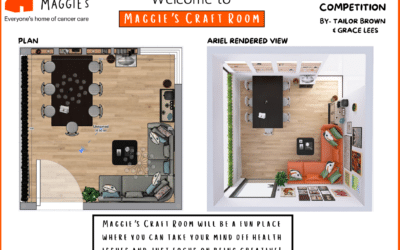
In November 2023, we invited pupils of Larbert High to design a new space for Maggie’s Cancer Centre, Forth Valley, in Larbert.

We’re delighted to sponsor our first Design Competition for Larbert High School students. The senior students are designing an indoor or outdoor space for Maggie’s Forth Valley Centre using the original Maggie’s Centre Blueprint.
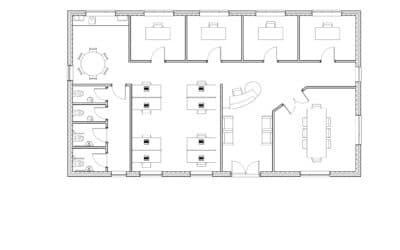
Can you spot the difference between the two floor plans created by Autodesk CAD Software?

Do you have an AEC Collection and not using it to its full potential?
Learn how to use 3ds Max, Formit or Navisworks to enhance your design workflow with our new Autodesk Training Courses.

Scotland’s leading Autodesk CAD Software and Training Centre, TMS CADCentre have signed up to support local cancer care charity Maggie’s Forth Valley in 2023 with the aim of raising funds to pay for a day of running the centre.

We join with people across the United Kingdom and around the world in mourning the death of Her Majesty Queen Elizabeth II.

AutoCAD 2023 includes specialised toolsets with thousands of custom parts and industry-specific features.