

Architecture is about turning ideas into buildable designs. Whether you’re developing a residential extension, commercial building or urban master plan, the ability to explore concepts quickly, communicate them clearly and refine them efficiently is essential.
That’s why SketchUp has become one of the most widely used 3D modelling platforms in architecture.
Known for its intuitive interface and flexible workflow, SketchUp allows architects to move seamlessly from early-stage concept design through to client presentations, planning submissions and construction documentation. Rather than slowing creativity with complex modelling processes, it helps you develop ideas naturally while remaining accurate enough to support the wider design team.
In this guide, we’ll explore why architects choose SketchUp, where it fits within the design process and the tools that make it such a valuable addition to modern architectural practice.
Unlike traditional CAD software, SketchUp was designed around the way designers think.
Instead of focusing on commands and technical workflows, SketchUp allows you to sketch in three dimensions, making it easier to develop, test and communicate ideas as they evolve.
Architects choose SketchUp because it offers:
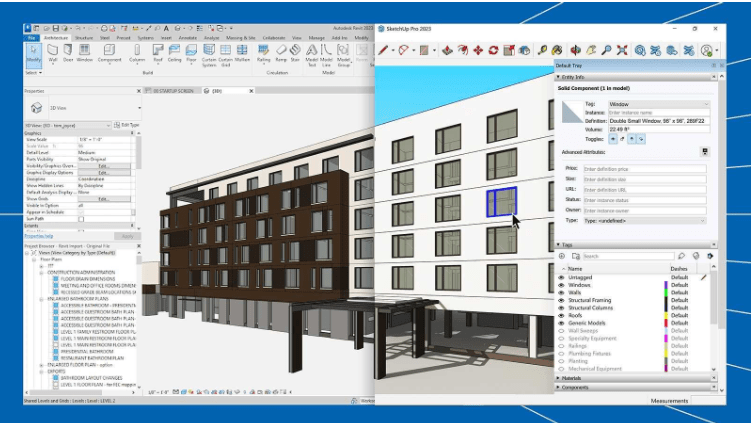
Rather than replacing BIM software such as Revit, SketchUp often complements it, giving architects a faster environment for conceptual design, feasibility studies and design communication before moving into detailed technical modelling.
One of SketchUp’s greatest strengths is its flexibility. It isn’t limited to one stage of a project; it supports architects from the first client meeting through to completed drawing packages.
SketchUp excels during the early stages of design.
Ideas can be modelled within minutes, allowing architects to compare different massing options, building forms and layouts without committing significant time to detailed modelling. This makes it easy to explore:
Models remain simple during this stage; discussions stay focused on design intent rather than unnecessary detail.
Successful architecture responds to its surroundings.
SketchUp’s Add Location feature allows architects to import aerial imagery, terrain and native 3D buildings directly into their project, creating immediate site context.
Working within a realistic environment makes it easier to evaluate:
For refurbishment and complex existing buildings, SketchUp Studio also supports point cloud workflows using Scan Essentials, enabling architects to model directly from survey data.
As concepts evolve, SketchUp provides the flexibility to add increasing levels of detail without disrupting the overall model. Professional workflows rely on organised modelling practices including:
Good model management not only improves performance but also makes collaboration easier as projects grow in complexity.
Modern architectural projects involve multiple disciplines working together.
SketchUp supports collaborative design through Trimble Connect, enabling architects to securely share models with clients, consultants and contractors throughout a project.
Rather than relying solely on emails or exported files, project teams can review live models, comment directly on designs and keep everyone working from the latest version.
Earlier collaboration often leads to:

Many architects still think of SketchUp as a conceptual modelling tool, but its integrated LayOut application enables professional 2D documentation directly from the model.
Using linked viewports, architects can create:
Because drawings remain connected to the live model, design changes can be updated more efficiently, reducing repetitive drafting work and helping maintain consistency across documentation.
Winning client approval often depends on how clearly a design is communicated.
SketchUp includes a range of visualisation tools that help transform technical models into engaging presentations. Using Scenes, Styles and Materials, architects can create presentation-ready views directly within SketchUp.
More recently, Diffusion has introduced AI-assisted conceptual visualisation, enabling designers to generate atmospheric imagery from SketchUp models during the earliest stages of design exploration.
These tools help clients understand proposals more quickly, leading to more productive discussions and faster decision-making.

One of the biggest misconceptions is that architects must choose between SketchUp and BIM software. Many successful practices use both, SketchUp is often used for:
While BIM platforms typically take over for:
This combination allows architects to benefit from SketchUp’s speed without sacrificing the detailed information required later in the project lifecycle.
Every architectural practice works differently.
One reason SketchUp remains so popular is its extensive Extension Warehouse, allowing firms to tailor the software to their own workflows. Popular extensions support:
Rather than installing dozens of plug-ins, most practices benefit from selecting a focused set of tools that solve specific workflow challenges.
Getting the most from SketchUp isn’t just about learning the tools; it’s about building efficient modelling habits.
We recommend:
Following these principles creates cleaner models, improves collaboration and reduces unnecessary rework throughout the project.
SketchUp has evolved far beyond its reputation as a simple 3D modelling package.
Today, it supports architects throughout the entire design journey, from early concept development and site analysis to coordinated documentation, collaboration and compelling client presentations.
Its intuitive approach encourages creativity, while powerful tools such as LayOut, Trimble Connect, Add Location and Diffusion help practices work more efficiently and communicate ideas with confidence.
Whether you’re an independent architect, a growing practice or part of a larger multidisciplinary team, SketchUp provides the flexibility to develop better designs without adding unnecessary complexity to your workflow.
At TMS CADCentre, we help architectural practices get the very best from SketchUp. From choosing the right licence and delivering accredited training to providing ongoing technical support, our specialists can help you build faster, collaborate better and make the most of every project.
Ready to see what SketchUp can do for your practice? Speak to our team today.