
Creating high-quality architectural visualisations has traditionally required specialist rendering software, powerful hardware and a considerable amount of time and experience.
For smaller practices and individual designers in particular, producing polished visuals could mean learning another piece of software, outsourcing rendering or dedicating significant time to creating images alongside the design itself.
Artificial intelligence is beginning to change that. AI-powered visualisation tools are making it easier for designers to turn their 3D models into compelling images, experiment with different ideas and communicate their vision without requiring the same level of specialist rendering knowledge.
With tools such as SketchUp AI Render, these capabilities are now becoming part of the SketchUp workflow itself.
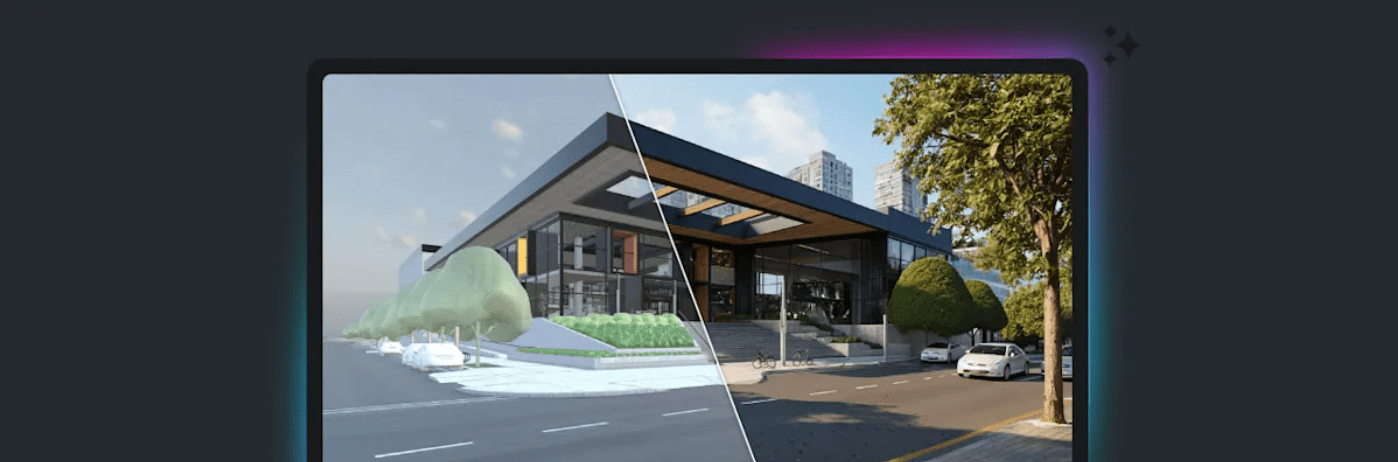
A 3D model might make complete sense to the person who created it, but clients and other stakeholders don’t always interpret models, plans or technical drawings in the same way.
Visualisation helps bridge that gap. A realistic or stylised image can help clients understand how a proposed space could look and feel before decisions are finalised. This can support conversations around:
The challenge has traditionally been the time and expertise required to produce those visuals. AI is beginning to reduce that barrier.
SketchUp AI Render allows users to generate images directly from their SketchUp models using artificial intelligence.
Starting with the geometry in your model, you can use natural-language prompts to describe the visual result you want to achieve. Instead of configuring every element of a traditional rendering workflow, you could describe a particular material, environment, architectural style or atmosphere and use AI to explore the result. This makes visualisation much more accessible during the design process.
Rather than waiting until a project reaches a later stage to invest time in a detailed render, designers can begin creating visuals while ideas are still being developed.
One of the most useful aspects of AI visualisation isn’t necessarily creating the final image. It’s iteration. Imagine you’ve created an early SketchUp model for a new interior. The layout may be relatively established, but you’re still exploring the overall design direction.
With AI Render, you could use that same model to investigate different ideas, perhaps a minimalist contemporary interior, a warmer natural-material approach or a completely different colour palette. Instead of manually recreating each option, AI can help you visualise different possibilities much more quickly.
This can make AI-generated images useful as part of the design process, rather than simply being something created at the end of it.
Traditional architectural visualisation can involve a significant learning curve.
Lighting, materials, textures, cameras and rendering settings can all require specialist knowledge to produce convincing results. There will always be projects where dedicated rendering tools and experienced visualisation professionals are the right choice.
However, not every visual needs that level of production. Sometimes a designer simply needs to communicate an idea. This is where AI can help level the playing field.
A smaller architectural practice, interior designer or independent professional can use AI-powered tools to produce visual content without necessarily investing the same amount of time in learning a specialist rendering workflow.
It allows more designers to use visualisation throughout their projects rather than treating it as a specialist process reserved for final presentations.
AI visualisation can also help improve conversations with clients.
Clients often find it difficult to imagine the finished result from a basic 3D model or technical drawing. Creating visual options gives them something much more tangible to respond to.
Instead of asking: “Would you prefer a warmer material palette?” You could show them what that alternative might look like.
This can make feedback more specific and help both designer and client understand whether they’re moving in the right direction. AI also makes it easier to create variations. If a client wants to see another material, different furniture or an alternative atmosphere, designers can explore those ideas without necessarily starting the visualisation process again from scratch.
Another advantage of AI is that visualisation doesn’t need to wait until a model is complete.
During concept development, models are often relatively simple. The purpose at this stage isn’t necessarily to produce a perfectly detailed representation of the finished project. It’s to explore possibilities.
AI-generated visuals can help designers communicate the intent behind these early models. That could make them useful during:
Being able to communicate an idea visually earlier can help teams gather useful feedback before significantly more time is invested in developing the design.
AI rendering and traditional rendering don’t necessarily need to be viewed as competing approaches. They solve different problems.
Traditional rendering tools remain important when precise control, physically accurate lighting, carefully specified materials or highly polished final imagery is required.
SketchUp Studio, for example, includes V-Ray alongside SketchUp’s AI capabilities, giving professionals access to both traditional photorealistic rendering and faster AI-powered visualisation workflows.
AI Render can instead be particularly useful when speed, exploration and iteration are the priority.
A designer might use AI to explore different concepts quickly before moving to a more controlled rendering workflow for the final presentation. The important point is that designers now have more options.
Another benefit of SketchUp’s approach to AI is integration.
Instead of exporting a model into a completely separate AI platform, SketchUp is bringing AI tools into its existing ecosystem. AI Render and AI Assistant are available across SketchUp’s modelling platforms, with current Desktop versions integrating these capabilities directly.
This reduces the need to move between multiple tools simply to experiment with a visual idea. Your 3D model remains the starting point. AI then becomes another way of exploring and communicating what’s already being designed.
AI can generate an impressive image, but an impressive image isn’t automatically good design.
The designer still needs to understand the brief, consider the people using the space, make appropriate material choices and determine whether an idea is practical.
There is also an important distinction between visualising an idea and documenting exactly what will be built. AI-generated imagery should therefore be treated appropriately within the design process.
Its strength lies in helping designers explore possibilities and communicate ideas quickly while leaving the important decisions in the hands of the designer.
From early concept exploration to client presentations, SketchUp provides flexible tools for modelling and communicating your design ideas. With AI-powered visualisation now integrated into the SketchUp ecosystem, it’s becoming even easier to turn 3D models into engaging visuals and explore different design possibilities.
At TMS CADCentre, we can help you understand the SketchUp solutions available and choose the right option for your business and workflow.
Contact our team today to discuss your requirements and start your SketchUp journey.