How to reverse transactions in Sage 200
Have you ever accidentally posted a transaction to the wrong account and wished to reverse it with quick to no fuss? Sage allows users to reverse it with a click of a button by including a feature called Reverse Transactions.
Here’s our step by step guide to reversing transactions:
Step 1. Go to Sales (or Purchases) > Adjust Transactions > Reverse Transaction.
Step 2. Enter the Account Code etc. of the account that you mistakenly posted toward to bring up all transactions against that account.
Step 3. Select the transaction you wish to reverse.
Step 4. Click Reverse
Step 5. On the following screen, if required, enter or change the reference.
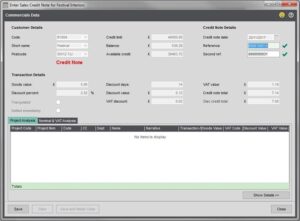
Step 6. If Sage is unable to locate the original nominal and VAT postings, change the account VAT analysis and Nominal analysis if required.
Step 7. Save the Reversal. This will reverse the transaction automatically for both the account and bank account. For example, in the Sales Ledger, a payment from the bank account will be placed against the wrongly entered receipt on the customer account.
Step 8. Post the transaction to the correct account.
Please note: if the transaction has been reconciled it will need to be unreconciled before it can be reversed. This can be done via Cash Book > Period End Routines > Unreconcile Bank Transactions. Once it has been unreconciled it is safe to reverse but all transactions will need to be reconciled afterwards.